How to Enable RTL Writing in Gmail for Arabic and Urdu Users
 |
| Click on the image to see in its full size |
Introduction
Right-to-left writing support matters whenever you are typing in languages such as Urdu, Arabic, Persian, or Hebrew. Simply changing text alignment is not enough, because the writing direction itself has to be set correctly for the text to display and read properly, especially when English words appear in the same line.
What is RTL?
RTL stands for Right-to-Left. It is the natural writing direction used by languages such as Arabic, Urdu, Persian, and Hebrew, where text begins from the right side of the page and moves toward the left.
In everyday typing, this direction affects not only how the words appear, but also how punctuation, numbers, and mixed-language sentences are arranged.
Gmail RTL Support
Gmail already includes built-in support for right-to-left editing. Google’s own help instructions show that users can turn on RTL editing support from Gmail settings under the language options.
Once this feature is enabled, the compose box becomes more suitable for typing Urdu and other RTL languages in a natural way.
How to Enable RTL Mode
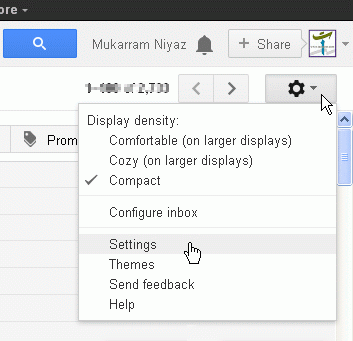
First, open your Gmail account and click the Settings icon in the top right corner. Then open the full settings page and look for the Language section.
There, enable the Right-to-left editing support on option and save the changes. After that, the compose editor will show both LTR and RTL writing directions, allowing you to choose the correct one before typing Urdu.
Use the screenshots below as a guide while following these steps.
 |
 |
 |
 |
| Click on the image to see in its full size |